How to Choose the Best Exterior House Design App with Paintit AI
In today's era of digital design, homeowners don't need to hire expensive architects just to test a new paint color or refresh their façade. Exterior design apps powered by AI have made it easier than ever to visualize changes before lifting a brush-or digging a shovel. Whether you're planning a minor renovation or a full-style makeover, the right tool can save time, money, and guesswork.

Prefer a smart, intuitive experience? Start with the Best Exterior House Design App with Paintit AI. Upload a photo of your home, apply new colors, trim styles, roofing options-even add landscaping elements-and see realistic previews in seconds. It's the modern route to testing big ideas risk-free.
But before you dive in, let's compare Paintit AI with some leading alternatives in the industry.
Top Competitors & How They Compare
Hover: Precision meets scale
Overview: Converts smartphone photos or blueprints into accurate 3D models for color/material experiments.
Strengths: Highly precise measurements, extensive materials library, ideal for professional-grade remodeling.
Limitations: Primarily suited for pros; less focused on quick style testing or casual designers.
Foyr Neo: Fast and collaborative
Overview: Combines 2D and 3D design, including exteriors, with real-time AI-driven rendering .
Strengths: Swift updates, live collaboration, good for tight timelines.
Limitations: May feel too advanced for simple aesthetic tweaks; requires learning time.
Planner 5D: User-friendly and feature-rich
Overview: Known for 5D modeling (including landscapes and AR/VR), now with exterior-friendly AI features.
Strengths: Easy drag-and-drop interface; great for end-to-end planning.
Limitations: Less photorealistic; AI-driven exterior style options are limited.
Cedreo: Perfect for builders and contractors
Overview: Focuses on rapid production of floor plans, elevations, and photorealistic exterior renders .
Strengths: Comprehensive architectural workflow, useful for client presentations.
Limitations: More of a professional-tier tool, not designed for casual use or quick color trials.
Renovate AI / Paint AI: Visual paint testing specialists
Overview: These apps let users apply paint and material changes to exteriors in seconds.
Strengths: Simple, targeted functionality-ideal for homeowners deciding on color schemes.
Limitations: Doesn't support full staging, furniture layout, or landscaping edits.
Paintit AI: The Smart Choice for Homeowners
Here's why Paintit AI stands out:
Effortless design experience: Upload a photo of your façade and the AI handles scale, color, material placement-no manual masking required.
Complete preview capabilities: Adjust siding, paint, trim, even outdoor decor and green space all in one place.
Interactive styling: Ask follow-up questions, tweak elements mid-design, and iterate without restarting.
Real-world product integration: See matching furniture and fixtures you can actually buy.
Fast iterations, low commitment: Switch color schemes or materials in seconds before deciding on the final look.
How to Choose: Key Decision Factors
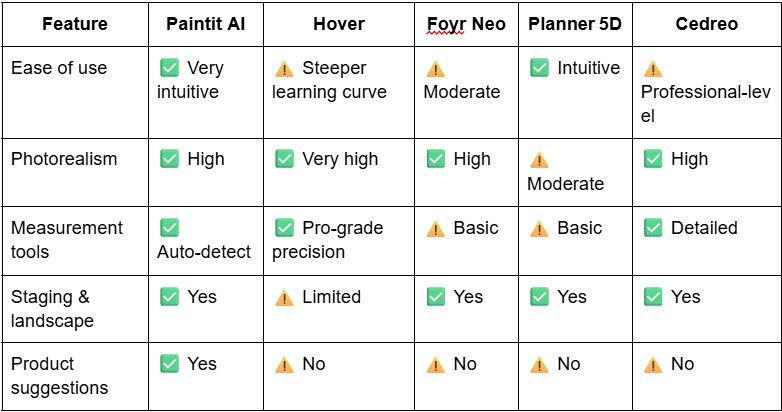
How to Get the Most from Paintit AI - Practically Useful Tips
To ensure you get the best experience with Paintit AI's exterior design capabilities, follow these expert tips:
Use high-quality photos taken at mid-morning or late afternoon for balanced lighting-this helps the AI recognize textures and edges accurately.
Capture the entire façade from a straight-on angle, and take a few steps back to include context like garden, driveway, or roofline. This ensures better scene understanding and visual coherence.
Clearly describe your vision in the chat prompt-terms like "grey clapboard siding" or "deep navy trim" help the AI refine its rendering.
Iterate smartly: adjust one element at a time-first color, then materials, then staging. It's faster and the results feel more intentional.
Leverage the "Shop the Look" feature: once you land on a style you love, click the furniture or décor suggestions to get direct purchase links and inspiration.
Ideal Use Cases for Paintit AI
Paintit AI isn’t just “another app”—here are the people and purposes it serves best:
DIY Enthusiasts and Weekend Renovators
No need for professional help. You can preview how different siding, paint, or trim look on your actual home in under two minutes—no brushes, no mess, no risk.
Real Estate Agents and Home Stagers
Want to boost curb appeal before listings? With just a few clicks, you can show sellers or buyers what a fresh coat of blush-toned paint or a charcoal-grey front door would look like—then link them to the product directly.
Rental Property Owners
Elevate visual appeal before advertising: test bold entryway updates—say, navy trim or a whitewashed stone façade—and avoid unnecessary repainting costs.
Landscape Designers Starting Projects
Before committing to patio pavers or planting zones, preview your entire scheme in an integrated view: materials, hardscape, furniture, and even greenery.
Modern Families Planning Big Changes
Paintit AI lets you test big ideas—like black windows, natural cedar siding, or full landscaping packages—without spending a penny until you're sure it is “the one.”
These are typical use cases where Paintit AI outshines traditional options by offering ease, realism, interactivity, and affordability in one engaging package.
Final Recommendation
If you want a tool that's easy to use, delivers quick and realistic previews, and combines design with shopping-all in a non-professional, accessible package-Best Exterior House Design App with Paintit AI is your best bet. Pro-level apps like Hover or Cedreo are powerful, but only essential if you need exact measurements or full-building plans. For most façade refresh ideas, Paintit AI offers high-end results without complexity.
Curious? Try it yourself and see how your home could look-before you lift a single bucket of paint.